How to Enable Notifications & Reminders
With Awake 1.0.7, you can now enable notifications to get reminded about setting an alarm, going to bed on time, or if there's an upcoming public holiday.
Please note that some types of reminders require ⭐️ Awake Pro.
Enable Notifications
To enable notifications:
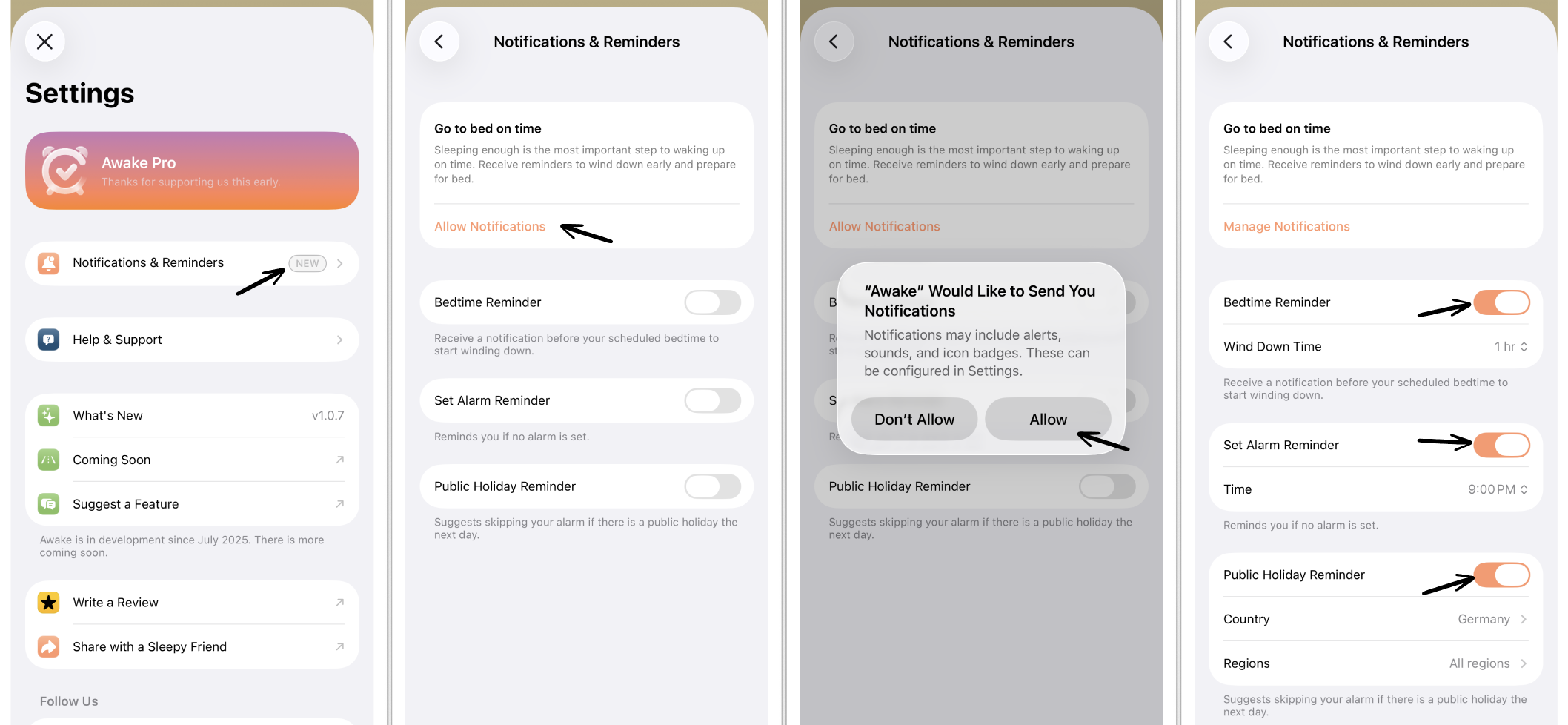
Go to your ⚙️ Awake Settings.
Select the Notifications & Reminders entry.
You first need to give Awake permission to send notifications to your device. For this, tap Allow Notifications.
A pop-up window will appear. Tap Allow. All reminders are enabled by default.
Without Awake Pro, you can test the Public Holiday reminder during the free trial. Afterward, you will have to upgrade to ⭐️ Awake Pro to access it.
Customize Reminders
There are different types of notifications you can get reminded about that help you make the most of your sleeping schedule.
Bedtime Reminder
You can receive a notification before your scheduled bedtime to start winding down. This can be helpful to remember to get ready for bed in time.
You can adjust how long in advance you want to get reminded. The default is set to 1 minute. You can adjust your individual time using the time wheels by tapping Wind Down Time. After selecting your preferred Wind Down Time, tap Wind Down Time again, and it is set.
Set Alarm Reminder
You can set notifications to get reminded to set an alarm if no alarm is enabled for the upcoming day. This can be helpful so you don't forget to set an alarm.
You can set the time when you want to be reminded. The default is set to 9:00 PM. You can adjust your individual time using the time wheels by tapping Time. After selecting your preferred alarm reminder time, tap Time again, and it is set.
Public Holiday Reminder ⭐️
You can set notifications to get reminded about an upcoming public holiday, to disable the alarm. This can be helpful to avoid the alarm going off if you want to sleep in on that day.
You can select a specific country and region for precise public holiday reminders. The default is set to the country you are in. To change this, tap on Country and choose your preferred country and region from the list.
⚠️ Not all regions are supported yet. Please reach out to support@awakeapp.io if your region is missing.